
org.thymeleaf.exceptions.TemplateInputException: Error resolving template [list], template might not exist or might not be accessible by any of the configured Template Resolvers
대충 스윽 봐도 exist로 봐서..파일을 못 찾는거 같은데..
아무리 봐도 정확한 위치에 템플릿이 있었는데 오류가 발생해서 속상했다...
이것저것 찾아 보다가 알게된 정보들과 해결한 방법에 대해서 포스팅해보겠다!
해당 오류가 발생한 것은 템플릿의 위치를 못찾는게 맞다!
그래서 확인해야 하는 것이 3가지가 있다.
1) controller
2) application.yml 또는 application.properties
3) template의 위치
나는 2번의 문제였다!
그래도 다른 분들은 여러 문제를 마주할 수 있으니 해당 템플릿을 소환(?)하는데 해당 오류가 발생했을 때 확인해야 하는 세가지를 모두 포스팅해보겠다.
1) Controller.java
@RequestMapping("/product")
@Controller
@RequiredArgsConstructor
public class ProcuctController {

    @GetMapping("/list")
    public String getProductList(Model model) throws Exception {
        List<Product> products = productService.getProductList();
        model.addAttribute("products",products);
        return "list";
    }
}
첫 번째, 해당 controller파일의 어노테이션이 @RestController가 아닌 @Controller인지 확인해야 한다.
둘의 차이는 tistory를 테크블로그로 쓰기 전에 사용하던 네이버 블로그에 정리한 적이 있어서 인용하겠다!
https://blog.naver.com/kimsha21/222901488009
[Spring] @RestController와 @Controller의 차이(feat. ResponseBody)
spring에서는 컨트롤러를 지정할 수 있는 어노테이션이 두 가지가 있다. 그게 바로, @RestController와 @...
blog.naver.com
우리는 템플릿을 불러오기 때문에 @RestController가 아닌 @Controller의 어노테이션을 활용해야 한다.
위의 블로그에 적혀 있지만, 그래서 view를 호출하는 컨트롤러와 정보를 불러오는 컨트롤러를 클래스를 따로 생성하는게 가독성과 유지보수에 편리할 것 같다!
두 번째 확인해야 하는 것이 return 되는 string값이 템플릿의 파일명과 동일한 지 다시 한 번 확인!!
2) appplication.yml
spring:
  thymeleaf:
    cache: false
    enabled: true
    prefix: classpath:templates/
    suffix: .html
나의 오류의 원인은 여기에 있었다!
prefix에 templates/html/ 설정해놓고 폴더도 초기에 잘 생성했는데 코드를 짜다가 html폴더의 쓸모를 못느꼈는지
삭제 후 바로 템플릿을 생성해놓고 위치 설정을 변경하지 않았었다!
(작은 거를 바꾸더라도 연결된 것이 없는지 고려해야 하는 건 없는지 항상 고민하기...)
모쪼록 classpath의 위치가 실제 템플릿 위치와 동일한 지 확인을 해줘야 하는 것이 두 번째이다!
3) template의 위치
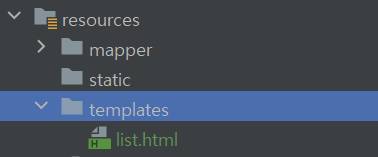
마지막으로 설정에 등록한 templates의 위치와 오타는 없는지를 확인해준다!
**그리고 static 파일은 주로 css같은 정적인 파일을 넣는 거라고 한다!
프론트 살짝 배우기..!